How to Lower Your Google Ads Cost Without Losing Leads
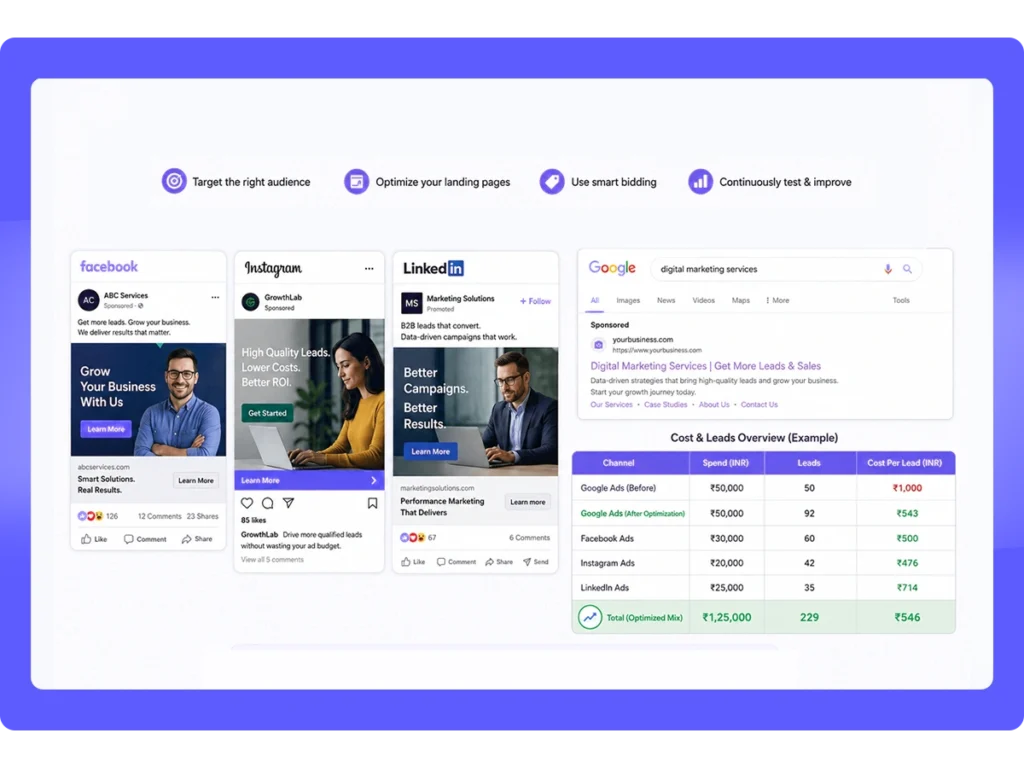
If your cost per click keeps creeping up while your results stay flat, you are not imagining it. An analysis of Alphabet’s own annual reports from 2018 to 2024 found that the volume of paid clicks rose every year, averaging about 14.5 percent annual growth, while average CPC climbed in three of those six years, and two businesses bidding on the exact same keyword in the exact same city can end up paying very different amounts for the same click.
The good news is that cost per click is not fixed. It is the output of an auction, and Google itself confirms that auction is decided by Ad Rank, a score based on your bid combined with your ad quality, and that higher quality ads can lead to lower costs per click. This guide walks through exactly how Google calculates what you pay, the specific levers you control, and the order to work through them so you lower your costs without losing the leads you actually want.
Table of Contents
The Short Answer: Cost Comes From Relevance, Not Just Budget
The amount you pay per click is not simply whoever bids the most. According to Google’s own explanation of how Ad Rank works, it comes from a combination of your bid and how relevant Google considers your ad, keyword, and landing page to be for that specific search.
This means a business with a lower bid but a more relevant ad and landing page can win a better position and pay less per click than a competitor bidding higher with a weaker, less targeted setup. The fastest way to lower your costs is not cutting your bid blindly. It is fixing the relevance problems that are driving your costs up in the first place.
How Google Actually Calculates What You Pay
Every time someone searches, Google runs an auction to decide which ads show and in what order. Your position and your actual cost per click come from something called Ad Rank, which combines your bid with the quality of your ad and landing page, as laid out in Google’s Quality Score documentation.
Quality is assessed through three components Google evaluates for each keyword:
- Expected click-through rate, the likelihood your ad gets clicked when it’s shown for that search
- Ad relevance, how closely your ad copy matches what the person actually searched for
- Landing page experience, how useful, relevant, and easy to navigate your landing page is once someone clicks
Google is explicit that the visible 1 to 10 Quality Score number is a diagnostic tool, not something plugged directly into the auction. What does affect the auction, and your actual cost, is the underlying quality assessment behind that score. In practice, this is why two businesses bidding on the same keyword in the same city can pay very different amounts. The one with stronger relevance across these three components consistently pays less for the same position.
Fix Your Keywords First
Broad keywords face more competition, and more competition pushes up cost per click. Broad match in particular can trigger a wide range of related searches, some of which have little to do with what you actually offer, which means you pay for clicks that were never going to convert.
What to do:
- Shift toward more specific, longer phrases (often called long-tail keywords) instead of single broad terms. A phrase like “emergency roof repair after storm damage” faces less competition and attracts someone further along in their decision than a broad term like “roofing company.”
- Start new keywords on exact or phrase match rather than broad match, so you have tighter control over which searches actually trigger your ad.
- Review your keyword list against your actual services. Keywords that are only loosely related to what you offer tend to drag down relevance and push up cost.
The person searching a longer, more specific phrase is also typically closer to ready to buy, which means you are often paying less per click while getting a higher-intent visitor in return.
Build a Real Negative Keyword List
If you are running search ads without a thorough negative keyword list, you are very likely paying for clicks you would never want. A local service business bidding on its core service term, without excluding related but irrelevant searches like “DIY,” “training,” “salary,” or “free,” will burn through budget on clicks that were never going to become customers.
What to do:
- Pull your Search Terms report and review it regularly, ideally weekly while a campaign is still being optimized.
- Flag any search query that does not match real buyer intent and add it as a negative keyword.
- Common categories worth excluding across most local service businesses: “free,” “cheap,” “DIY,” “how to,” “jobs,” “salary,” “training,” and competitor brand names, unless you are deliberately running competitor campaigns.
This is one of the fastest, lowest-risk ways to reduce wasted spend, since you are not touching your bids or your targeting. You are simply telling Google which searches should never trigger your ad in the first place.
Improve Your Quality Score Components
Since relevance is what actually drives cost down, improving the three Quality Score components directly addresses the root cause rather than just lowering your bid and hoping for the best.
Expected click-through rate: Write ad copy that speaks directly to the specific keyword it’s tied to, rather than running one generic ad across an entire account. Testing two or three ad variations per ad group and pausing the weakest performers over time keeps your click-through rate improving rather than stagnant.
Ad relevance: Make sure your keyword, your ad headline, and your ad description are all telling the same story. An ad group built around “emergency plumbing repair” should have ad copy that actually says “emergency plumbing repair,” not a generic message about plumbing services in general.
Landing page experience: Send traffic to a page that matches what the ad promised, loads quickly, and makes the next step obvious. A relevant ad pointing to a generic homepage, rather than a page built around that specific service, undercuts everything else you’ve done well.
All three components work together. Strong ad copy pointing to a weak landing page still drags your relevance down, and a great landing page paired with vague, generic ad copy does the same thing in reverse.
Tighten Your Targeting (Location, Device, and Schedule)
Even with strong keywords and ad copy, when and where your ads show plays a real role in cost efficiency.
Location: If you serve a defined service area, make sure your campaign targeting matches it. Casting too wide a net means competing in markets where you have no real presence or pricing advantage.
Device: Review performance by device. If conversions skew heavily toward mobile or desktop, bid adjustments can shift more of your budget toward the device that’s actually converting.
Ad scheduling: Most local service businesses do not need ads running 24 hours a day. Reviewing when your conversions actually happen, then pausing ads or lowering bids during hours that generate clicks but rarely convert, reduces wasted spend without touching your core targeting. A common pattern for local services is strong conversion activity in the morning and early evening, with very little legitimate demand overnight, aside from genuine emergency categories like locksmith or emergency plumbing services.
Choose the Right Bidding Strategy
Manual bidding gives you direct control early on, which is useful while you’re still gathering data and tightening keywords and negatives. Once a campaign has accumulated a meaningful amount of conversion data, automated strategies like Maximize Conversions or Target CPA often start to outperform manual bidding, since Google’s systems can adjust bids at the individual auction level in ways a person manually adjusting bids cannot match.
A practical approach:
- Start new campaigns with manual bidding while you’re still cleaning up keywords, negatives, and ad copy.
- Once you’ve accumulated a reasonable volume of conversions, typically several dozen within a recent window, test an automated strategy aligned with your actual goal.
- Watch your cost per conversion, not just your cost per click, when comparing strategies. A lower CPC that comes with a lower conversion rate has not actually saved you money.
Fix the Landing Page, Not Just the Ad
It’s easy to focus entirely on keywords and bidding while sending traffic to a landing page that was never built for paid search. A slow, generic, or unfocused landing page quietly undermines every other optimization you make, since it drags down both your conversion rate and your underlying quality assessment.
What a strong landing page for paid traffic typically includes:
- A headline that matches the specific ad and keyword that brought the visitor there
- Fast load times, since slow pages lose visitors before they ever see your offer
- A clear, single next step, rather than multiple competing calls to action
- Content that actually answers what the person searched for, not a generic overview of your entire business
If your website is built as a single general homepage rather than dedicated pages for your core services, this is often the single biggest opportunity for cost reduction, since no amount of keyword or bidding work fully compensates for sending a high-intent click to an irrelevant page.
What Lowering CPC Should Not Cost You
A lower cost per click is only a win if it doesn’t also lower the quality of the traffic you’re getting. Cheaper clicks from the wrong audience are worse than more expensive clicks from people genuinely ready to act, since you’ve spent money without actually moving closer to a sale.
A few signals to watch while you optimize:
- Cost per conversion, not just cost per click, since this is the number that actually reflects whether you’re saving money
- Impression share, to confirm you haven’t cut your visibility so much that you’re missing valuable searches entirely
- Lead quality, since a cheaper click that produces an unqualified lead has not actually improved your results
The real goal throughout all of this is reducing wasted spend while keeping the traffic that converts, not chasing the lowest possible CPC number for its own sake.
A Realistic Order of Operations
If you’re working through this for the first time, this rough sequence tends to produce results fastest, with the least risk of accidentally cutting traffic that was actually converting:
- Pull your Search Terms report and build a negative keyword list. This is low-risk and often shows results within days.
- Tighten loose, broad keywords into more specific phrases. This reduces irrelevant competition without touching your bids.
- Review and improve ad copy relevance so headlines and descriptions clearly match the keywords driving traffic.
- Audit your landing pages against the specific ads sending traffic to them.
- Adjust targeting by location, device, and time of day based on where your actual conversions are happening.
- Reassess your bidding strategy once you have enough conversion data to consider automation.
Working through these in order, rather than all at once, also makes it easier to tell which change actually moved your numbers.
Want a Clear Read on Where Your Ad Budget Is Actually Going?
Most accounts have a handful of specific, fixable issues driving up cost per click, not a fundamental problem with the platform itself. A focused audit usually surfaces exactly where the budget is leaking before any bigger changes are made. Our Paid Search Management services are built around exactly this kind of ongoing account work, from keyword and negative keyword cleanup to bidding strategy and landing page alignment.
Book a Strategy Session and we’ll walk through your account together to find out where your ad spend is actually going.
FAQs: Lowering Google Ads Cost
Does lowering my bid actually lower my cost per click? Sometimes, but it also risks losing impression share and ad position if you lower it too aggressively. Improving relevance through keywords, ad copy, and landing pages tends to lower cost per click more sustainably, since it addresses the underlying auction mechanics rather than just capping what you’re willing to pay.
How fast can negative keywords lower my costs? Often within days to a couple of weeks, since negative keywords stop wasted spend immediately rather than waiting for a longer-term quality improvement to take effect. This is usually the fastest, lowest-risk place to start.
Should I switch to automated bidding to lower costs? It depends on how much conversion data you have. Automated strategies tend to perform best once a campaign has accumulated enough recent conversions for Google’s systems to optimize against. Switching too early, before there’s enough data, often performs worse than manual bidding.
Is a lower cost per click always a good thing? No. A lower CPC that comes from attracting the wrong audience or an irrelevant search isn’t actually a win, since the goal is a lower cost per conversion, not just a lower cost per click. Always check conversion data alongside CPC before judging whether a change worked.
How often should I review my Google Ads account once costs are under control? Even after your initial optimization, a weekly or biweekly review of the Search Terms report and overall performance helps catch new sources of wasted spend before they accumulate, since search behavior and competition shift over time.
Can a better landing page really affect my cost per click? Yes. Landing page experience is one of the three components Google evaluates when assessing ad quality, and that quality assessment directly factors into your auction outcomes and what you ultimately pay per click.
Not sure where your specific account is losing money? Contact Luniea today and we’ll take a look together.